Every engineering leader has been there. Phone rings at 2 AM. Something's down.
The question running through your head: How long until we're back?
Not "What's broken?" Not "Who's on-call?"
"How long is this going to hurt?"
Teams that can answer that question with confidence? They sleep better.
Teams that can't? They're guessing. And guessing is stressful.
MTTR isn't a vanity metric. It's what lets you answer the 2 AM question without guessing.
Here's what most teams get wrong: they focus on debugging faster, but the biggest wins come from detecting incidents sooner and coordinating cleaner.
Why This Isn't Another "10 Tips to Reduce MTTR" Article
Googling "how to reduce MTTR" gives you hundreds of articles with the same generic advice:
- "Improve your monitoring"
- "Have runbooks"
- "Assign clear roles"
- "Learn from incidents"
This advice isn't wrong. It's just incomplete without context.
Generic advice assumes every team is at the same stage. But a 15-person startup doesn't need the same thing as an 80-person scale-up.
This article isn't 10 generic tips. It's about which problems actually matter at YOUR stage, and which ones you can ignore.
The Three Types of Teams (And Which One You Want to Be)
Based on our conversations with 25+ engineering teams, we see the same three patterns over and over.
Type A: "We're Too Small to Track Metrics"
What they say:
"We're 20 people. We have like 3 incidents a month. Why do I need another metric to track? I know when things are broken."
What actually happens:
- Incident happens at 11 PM on a Friday
- No idea if this is normal or "really bad"
- Customer asking "when will this be fixed?" and you're guessing
- Post-incident, someone asks "how long was that?" and nobody knows for sure
The problem: You're flying blind. Every incident feels like a crisis because you have no baseline.
What we tell them: You don't measure MTTR to impress your board. You measure it so that when things break at 2 AM, you can say "We'll be back in ~45–60 minutes" and actually mean it.
A common effect: once teams know their baseline, incidents feel less like panic and more like routine execution.
Type B: The "Yeah, Like 2 Hours?" Crew
What they say:
"We track incidents. I mean, we know roughly how long things take."
What actually happens:
- Someone asks "What was MTTR last month?"
- Response: "Uh, like 2 hours? Maybe?"
- Or someone spending hours calculating it from logs and tickets
The problem: If you need a person to calculate MTTR, you don't have MTTR, you have manual reporting.
Type C: The "Our Process Is Making Everyone Miserable" Trap
What they say:
"We have a mature incident process. MTTR is part of our quarterly goals."
What actually happens:
- 12-field incident forms that nobody fills out properly
- Incident review meetings where people justify why something took 4 hours instead of 3
- Teams stop declaring incidents to avoid "hurting the metrics"
The problem: If your incident process adds more work than it removes, engineers will route around it (and your data becomes fiction).
What we tell them: Your MTTR process should be invisible. If engineers are thinking "ugh, now I have to do the incident paperwork," you've failed. Many teams switching from complex tools like PagerDuty to simpler alternatives see MTTR improve just because engineers actually use the system—see our comparison of PagerDuty alternatives for tools designed for smaller teams.
So What Actually Works?
Fast teams do these three things:
1. Measure MTTR From Day One (Even If You're Small)
Why: Confidence, not metrics
When you're 15 people and having 3 incidents a month, knowing your average MTTR means:
- New incident happens → You know if this is normal or "oh shit, this is bad"
- Customers ask "when will this be fixed?" → You can give a real answer, not a guess
- Post-incident review → You have data, not feelings
How simple can it be?
Incident #23: API outage
Declared: 2:34 PM
Resolved: 3:19 PM
MTTR: 45 minutes
That's it. You don't need a dashboard. You need a spreadsheet to start.
2. Make It Automatic (No Manual Work Allowed)
The rule: If an engineer has to manually enter data to track MTTR, your process is too expensive.
What works:
- Incident declared → Timestamp auto-recorded
- Incident resolved → Timestamp auto-recorded
- MTTR = Calculated automatically
3. Keep the Process Lightweight
The trap: You start with good intentions ("let's track some useful data") and end up with a 12-field incident form.
Minimal required fields:
- Incident title
- Severity (P0/P1/P2)
- Assigned to
- Status (Investigating / Identified / Monitoring / Resolved)
Everything else is optional.
If you make 12 things required, engineers will either hate you or put garbage in half the fields. Keep the required fields tiny. Collect the rest later if needed.
The MTTR Math Nobody Talks About
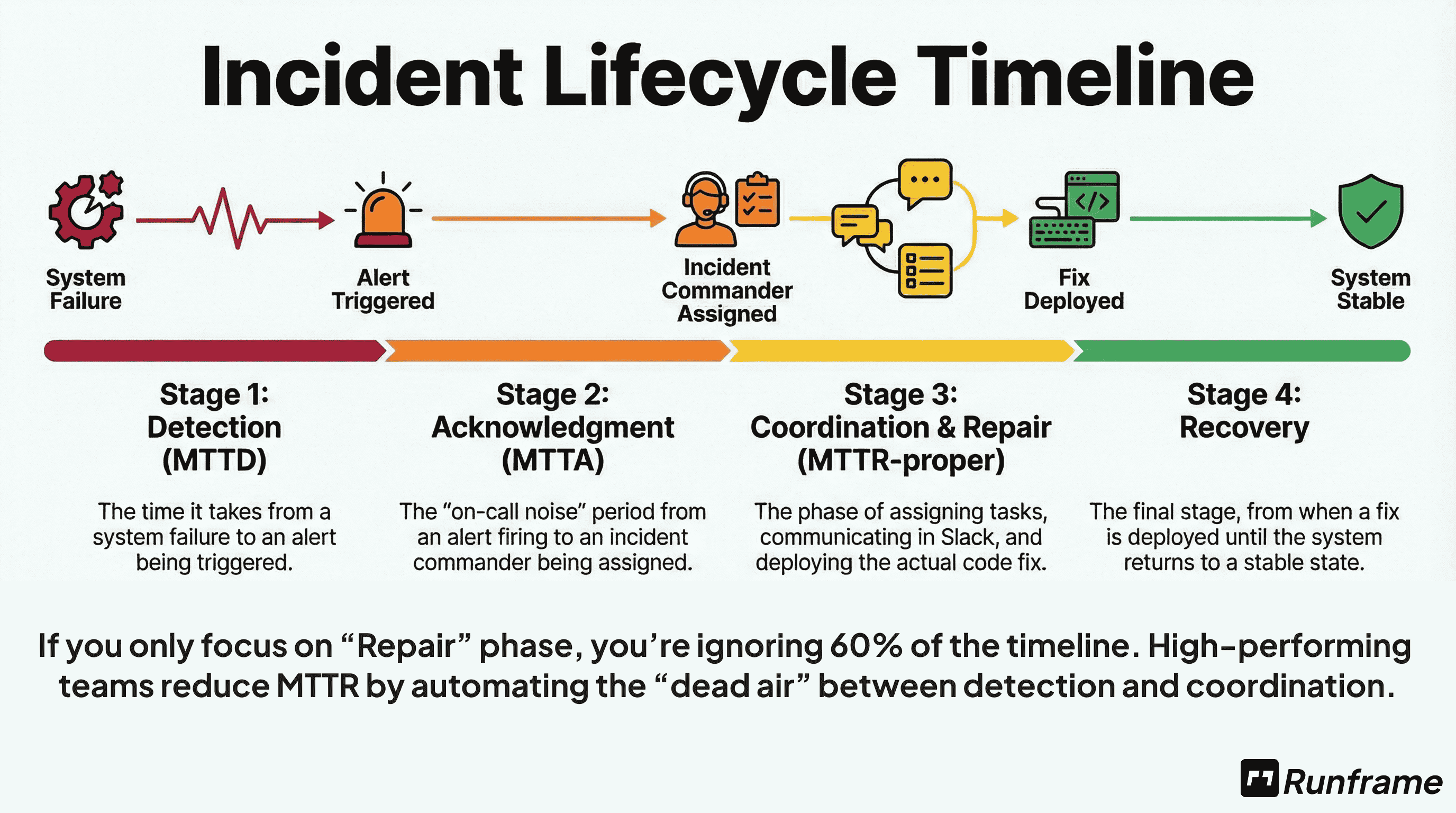
MTTR isn't one thing. It's three:
Time to Detect: Incident happens → You notice (also called MTTD)
Time to Coordinate: You notice → Right people working on it
Time to Fix: Start debugging → Service restored
Total MTTR = Detection + Coordination + Fixing
Stop the Spreadsheet Toil
Don't calculate these metrics by hand. Use our Free MTTR & Reliability Calculator to get your P50 and P95 benchmarks instantly.
Here's the insight most teams miss:
Most teams optimize "Time to Fix" (better debugging, faster deploys).
But the fastest teams? They optimize Detection and Coordination first.
Why:
- Better alerting (detect 10 min faster) = 10 min saved
- Clear roles + dedicated channel (coordinate 8 min faster) = 8 min saved
- Faster debugging (fix 5 min faster) = 5 min saved
The math: Improve detection + coordination = 18 minutes saved per incident. Improve debugging = 5 minutes saved.
How Teams Actually Reduce MTTR
| Approach | Time Saved | Effort | When to Do It |
|---|---|---|---|
| Faster Detection | 10-20 min/incident | Low | Do first - biggest ROI |
| Better Coordination | 8-15 min/incident | Low | Do second - cheap wins |
| Faster Debugging | 5-10 min/incident | High | Do last - hardest to improve |
| Add more tooling | -5 min (slower!) | Medium | Avoid - adds coordination tax |
Teams that optimize detection + coordination see 20-30% MTTR reduction in 3 months with minimal engineering effort.
The MTTR Trap: Why "Lower is Better" Can Be a Lie
If your MTTR is dropping but your customer churn is rising, you have a measurement problem.
The Flaw: Aggregating SEV3 (minor) and SEV0 (catastrophic) incidents
When you lump all incidents together, you're averaging apples and oranges. A 2-hour SEV3 (minor feature broken) is completely different from a 2-hour SEV0 (payment processing down).
What happens: Your overall MTTR looks great because you're closing lots of quick SEV3s. But your SEV0 MTTR could be getting worse, and those are the incidents that actually matter.
The Fix: Segment your MTTR by Severity
A 4-hour SEV3 is fine; a 4-hour SEV0 is a business-ending event.
Track these separately:
- P0 MTTR: Customer-facing outages (this is what keeps you up at night)
- P1 MTTR: Degraded service (important but not critical)
- P2 MTTR: Minor issues (nice to track, but don't stress about it)
The teams that sleep soundly at night? They know their P0 MTTR is 45 minutes. They don't care that their P2 MTTR is 4 hours.
Practical Guide: MTTR by Company Stage
If You're Under 20 People
Do this:
- Start a spreadsheet (yes, really)
- Track: Incident #, title, severity, declared time, resolved time, MTTR
- Review monthly: "Are we getting faster or slower?"
- Track P0 incidents (customer-facing); skip P2s (too much noise)
Start with P0 only if you want it even simpler.
Don't do this:
- Build fancy dashboards
- Set MTTR goals (you don't have enough data yet)
Goal: Get enough data to know your baseline. After 20-30 incidents, you'll see patterns.
If You're 20-80 People
Do this:
- Move from spreadsheet to an actual tool
- Make MTTR tracking automatic (no manual work)
- Track by severity: P0 MTTR, P1 MTTR
- Look for outliers: "Why did this P0 take 4 hours when average is 45 minutes?"
Don't do this:
- Make engineers fill out 12-field forms
- Set arbitrary MTTR reduction goals ("reduce by 20%!")
- Game the system by not declaring incidents
Goal: Understand what's driving your MTTR. Is it detection time? Fix time? Coordination issues?
If You're 80+ People
Do this:
- Track MTTR by service (is API slower than frontend?)
- Track by time of day (are 2 AM incidents slower?)
- Track by incident commander (is everyone getting faster, or just a few people?)
- Use MTTR to identify systematic issues, not blame individuals
Goal: MTTR is one input among many. Don't optimize it at the cost of everything else.
What Actually Reduces MTTR (Besides Metrics)
Tracking MTTR doesn't reduce it. Actions reduce MTTR.
1. Faster Detection (Not Faster Fixing)
Most teams focus on "how do we fix incidents faster?"
But the teams with the best MTTR? They focus on detecting incidents faster.
A common pattern: the biggest wins come from faster detection and cleaner handoffs, not shaving minutes off debugging.
Without clear severity classification, you can't prioritize detection efforts. Use our Incident Severity Matrix to standardize how your team classifies incidents.
What to do:
- Better alerting (not more alerts, better alerts)
- Runbooks that say "if this alert fires, check X first"
- On-call coverage that's explicit (and tested)
2. Reduce Coordination Overhead
You know what kills MTTR? Not the technical fix. The coordination.
The worst incidents aren't the hardest technical problems. They're the ones where three people are debugging the same thing, nobody knows who's doing what, and stakeholders are emailing every 10 minutes asking for updates.
Coordination overhead isn't just an MTTR problem, it's an engineering productivity killer. Read our Engineering Productivity Framework to see how top teams minimize context-switching during incidents.
What to do:
- Declare incidents properly (create a dedicated channel)
- Assign roles (incident commander, scribe, technical lead)
- Status updates every 30 minutes (even if "still working on it")
- One place for updates (not scattered across tools — manage incidents directly in Slack)
3. Have Runbooks (Even Simple Ones)
Teams with runbooks fix incidents faster.
What to do:
- Document your top 5 recurring incidents
- For each: What to check first, what to check second, who to escalate to
- Keep them simple (one page or less)
- Update them after incidents (if the runbook was wrong, fix it)
4. Learn from Every Incident
The fastest teams aren't just fixing incidents faster, they're learning from each one to prevent the next.
After the dust settles, run a post-incident review to capture what went wrong and what to change. Teams that do this see their MTTR drop 20-30% over 6 months, not because they're debugging faster, but because they're having fewer incidents.
MTTR Benchmarks: What's Typical
Everyone wants to know "what's a good MTTR?"
Based on our conversations with 25+ teams (20-180 people, mostly SaaS/fintech), here's what we see directionally:
| Company Size | Typical P0 MTTR Range |
|---|---|
| Under 20 people | 30-60 min |
| 20-80 people | 35-75 min |
| 80+ people | 40-120 min |
Based on conversations with 25 engineering teams (20-180 people, SaaS/fintech). Use as directional guidance, not targets.
What this means:
- If your P0 MTTR is 90 minutes, you're not "failing", you might have complex systems
- If your P0 MTTR is 15 minutes, you're not necessarily "winning", you might be under-declaring incidents
- Use these as sanity checks, not targets
The goal isn't to beat benchmarks. The goal is to know YOUR baseline and improve from there.
The Anti-Pattern: How Teams Game MTTR
We've seen teams do things to "improve MTTR" that actually make things worse.
| Gaming the System | What Happens |
|---|---|
| Don't declare P0s to avoid hurting metrics | Your "improved" MTTR is fake; you're actually slower at real incidents |
| Declare incidents as "resolved" when you've just band-aided the fix | MTTR looks great; recurrence rate explodes |
| Exclude "hard" incidents from MTTR calc ("that was an outlier") | You're lying to yourself about how fast you actually are |
| Set impossible MTTR goals ("all P0s must be fixed in 30 min") | Engineers stop taking incidents seriously because the goals are a joke |
Do this instead:
- Track MTTR honestly (include the ugly incidents)
- Look at trends, not absolute numbers
- Ask "why did this take 4 hours?" not "how do we hit an arbitrary target?"
What Good MTTR Tracking Looks Like
Based on teams that do this well, here's the pattern:
Automatic, not manual:
- Incident declared → Timestamp auto-recorded
- Incident resolved → Timestamp auto-recorded
- MTTR calculated → No spreadsheets, no guessing
Lightweight process:
- Required fields: Title, severity, owner, status (that's it)
- Everything else optional
- Engineers actually use it because it's not painful
Multi-dimensional analysis:
- By service (which systems are slowest?)
- By severity (P0 vs P1 vs P2)
- By time of day (2 AM vs 2 PM incidents)
If your current tool makes engineers hate the process, find a better one.
(Disclosure: we're building Runframe. The principles above apply regardless of tool.)
What You Should Do This Week
If You're Not Tracking MTTR At All
Today (15 minutes):
- Open Google Sheets
- Columns: Incident #, Title, Severity, Declared Time, Resolved Time, MTTR
- Fill in your last 3 incidents from memory
This week:
- Track the next 5 incidents as they happen
- After 5: Look for patterns ("Getting longer? Shorter? All at 2 AM?")
This month:
- After 20 incidents: Calculate median P0 MTTR
- That's your baseline
Goal: Stop flying blind.
If You're Guessing or Doing Manual Work
This week:
- Ask your team: "How much time do we spend calculating MTTR?"
- If answer is >30 mins/week → Too expensive
- Write a simple script OR evaluate tools
Next week:
- Implement automated tracking
- Stop doing manual work
Goal: Free up time to reduce MTTR instead of calculating it.
If Your Process Is Making Everyone Miserable
Today:
- Ask engineers: "What's the most annoying part of our incident process?"
- List the top 3 annoyances
This week:
- Remove 1 required field from incident form
- Or: Cut incident review meeting from 60 min → 30 min
- Or: Stop asking "why was this 4 hours instead of 3?"
This month:
- Simplify until engineers stop complaining
Goal: Make MTTR tracking invisible, not painful.
FAQ
Q: What's a "good" MTTR?
Q: Should I tie MTTR to performance reviews?
Q: What if our MTTR is really high?
Q: Our MTTR varies wildly (20 min to 6 hours). Is that normal?
Q: Should we track MTTA (Mean Time to Acknowledge) separately?
Q: What's the difference between MTTR and MTBF?
Q: Should we aim for zero downtime or faster recovery?
Next Steps
Want a lightweight MTTR template? Reply or DM, I'll share what we use.
Runframe is modern incident management for teams that hate enterprise bloat. Get started free.