SLACK NATIVE

Slack-Native
Incident Management.

Declare incidents, page on-call engineers, update stakeholders, and generate post-mortems—all without leaving Slack. The Slack-native incident management platform that teams actually use.

Used by engineering teams at high-growth startups to reduce MTTR by 40-60%

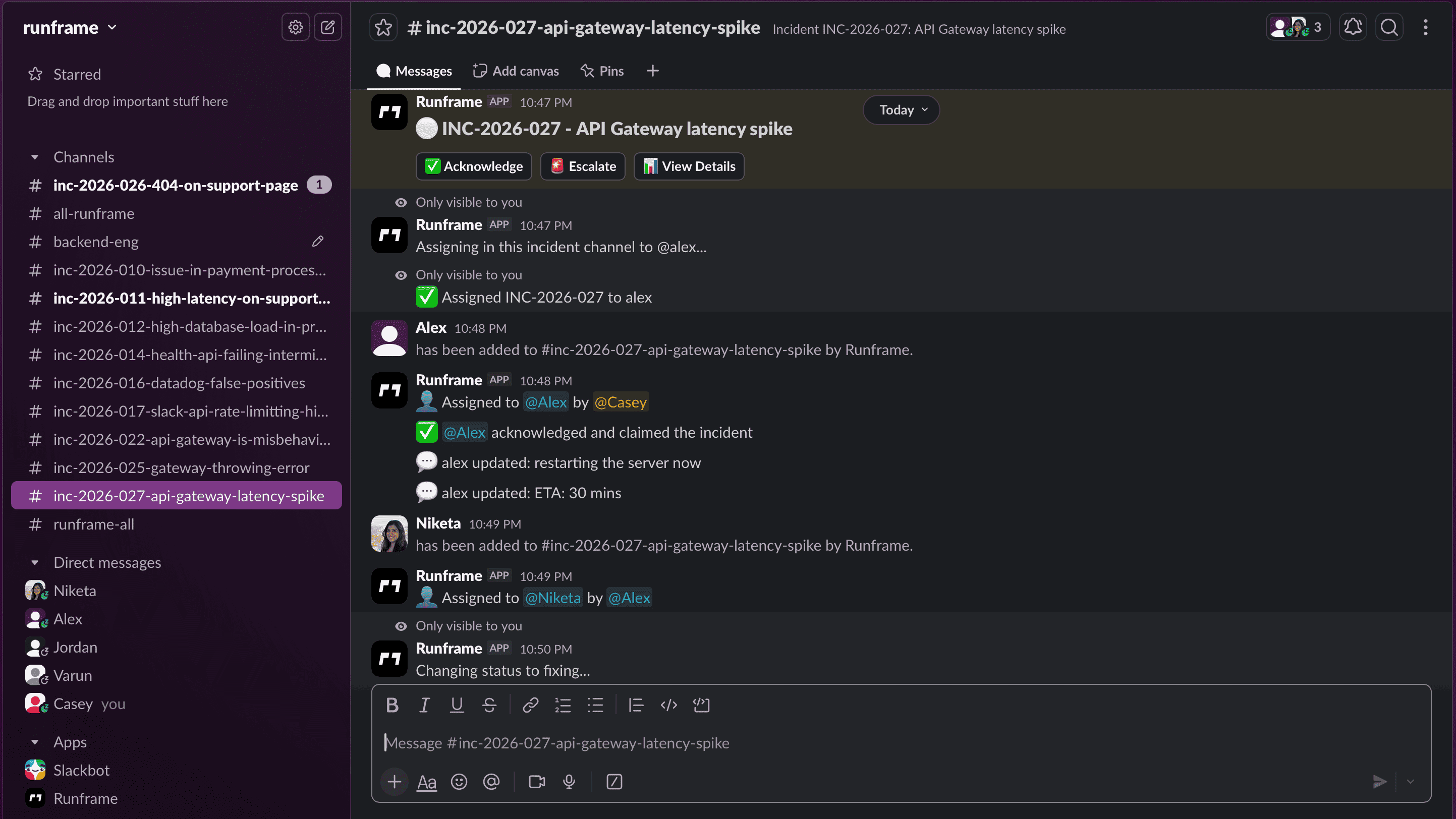
Runframe Slack Integration Dashboard

Benefits of Slack Integration for DevOps Teams

Why engineering teams choose Slack-native incident management over traditional tools

Reduced MTTR

Teams using Slack-native incident management report 40-60% faster resolution times. No app switching means immediate response.

No Context Switching

Stay in Slack while managing incidents. Declare, assign, update, and resolve without leaving your communication hub.

Better Team Adoption

Engineers already live in Slack. No training required—your team will actually use the incident management tool.

Faster Response Times

On-call engineers receive immediate Slack notifications. Acknowledge, assign, or resolve incidents in seconds.

Automatic Documentation

Every Slack message is captured. No more forgetting to document incident timelines or decisions.

Simplified Workflow

One interface for everything. Slash commands, real-time updates, stakeholder notifications—all in Slack.

Slack Features for Complete Incident Response

Everything you need for incident management, right in Slack

Incident Declaration

Type `/inc create` or `/inc declare` to instantly create incidents. Specify severity, add descriptions, assign responders, and automatically create dedicated incident channels.

/inc create severity:SEV0

On-Call Paging

Intelligent routing based on service ownership and escalation policies. Page on-call engineers with `/inc page @user` or `/inc page oncall`.

/inc page oncall

Status Changes

Change incident status with `/inc move [status]`. Move between investigating, identified, monitoring, resolved, and closed.

/inc move monitoring

Timeline Updates

Add structured timeline updates with `/inc update [message]`. Every update is captured for post-mortem analysis.

/inc update Deployed hotfix to prod

Automatic Timelines

Every Slack message is automatically captured into a structured timeline. No manual documentation required—everything is audit-ready.

Automatic capture

Assignment & Resolution

Assign incidents to specific users with `/inc assign @username` and resolve with `/inc resolve [summary]`.

/inc resolve Fixed race condition

Slash Commands for Slack Incident Management

Powerful commands that transform Slack into your incident command center

/inc create or /inc declare

Create a new incident. Opens a modal to specify severity, add description, and assign responders. Automatically creates a dedicated incident channel.

Example: /inc create
/inc assign @username

Assign an incident to a specific user. From incident channel: `/inc assign @username`. From anywhere: `/inc assign INC-123 @username`.

Example: /inc assign @sre-lead
/inc page @user or /inc page oncall

Page on-call engineers or specific users. Routes to the correct person based on on-call schedules.

Example: /inc page oncall
/inc move [status]

Change incident status. Valid statuses: investigating, identified, monitoring, resolved, closed.

Example: /inc move monitoring
/inc update [message]

Add a structured timeline update to the incident. Every update is captured for post-mortem analysis.

Example: /inc update Deployed hotfix to prod-3
/inc severity [level]

Change incident severity level. Valid levels: SEV0-SEV4 (or critical, high, medium, low, pre-emptive).

Example: /inc severity SEV1
/inc resolve [summary]

Mark an incident as resolved with a summary. Automatically calculates MTTR and closes the incident.

Example: /inc resolve Fixed race condition in payment service
/inc close

Close an incident completely. From incident channel: `/inc close`. From anywhere: `/inc close INC-123`.

Example: /inc close

How to Set Up Slack Integration in 3 Steps

Get started in under 5 minutes—no complex configuration required

01

Connect Slack

Click "Add to Slack" and authorize the application. We use OAuth 2.0 for secure authentication.

02

Configure Commands

Runframe automatically adds slash commands to your workspace. Customize on-call schedules and escalation policies.

03

Go Live

Type `/inc create` or `/inc declare` to create your first incident. Your team is now responding faster than ever.

Slack Integration Use Cases for Engineering Teams

Real scenarios where Slack-native incident management makes the difference

Production Incidents

When production breaks at 3 AM, on-call engineers need immediate coordination. Slack incident management enables instant declaration, automatic paging, and real-time updates—all from the channel where your team already responds.

Security Incidents

Security teams need rapid response and complete audit trails. Every Slack message is automatically captured for compliance. Stakeholder updates happen instantly without leaving the secure Slack environment.

On-Call Coordination

Managing on-call schedules across multiple teams is complex. Slack integration simplifies coordination—page the right person automatically, escalate when needed, and track response times without any phone calls or separate tools.

Post-Incident Reviews

Post-mortems shouldn't take hours. Runframe analyzes your Slack incident transcript to generate timelines, identify root causes from discussions, and suggest action items. Review, edit, and export—all within Slack.

What is Slack-Native Incident Management?

Slack-native incident management means your entire incident workflow happens inside Slack—the place where your engineering team already communicates. Instead of switching between PagerDuty for alerts, a separate incident dashboard for updates, and Slack for coordination, Runframe consolidates everything into one seamless experience.

When production breaks at 3 AM, the last thing your on-call engineer needs is context switching. With Runframe's Slack integration for DevOps, every incident action—a declaration, assignment, status update, and post-mortem—happens through familiar slash commands and real-time messages. The result? Faster incident response, better team adoption, and significant reduction in Mean Time To Resolution (MTTR).

Traditional incident management tools force engineers out of their workflow. Runframe brings incident management to where the work already happens: Slack. Type /inc create or /inc declare and you're live. No context switching, no separate dashboards, no friction.

Frequently Asked Questions

Everything you need to know about Slack incident management

What is Slack-native incident management?

Slack-native incident management means your entire incident workflow happens inside Slack. Instead of switching between PagerDuty, a separate incident tool, and Slack, Runframe brings everything into your existing Slack workspace. Declare incidents with slash commands, page on-call engineers, update stakeholders, and generate post-mortems—all without context switching.

How do I declare incidents in Slack?

Runframe provides simple slash commands for incident declaration. Type `/inc create` or `/inc declare` in any Slack channel to instantly create an incident. You can specify severity, add description, assign responders, and more. The command automatically creates a dedicated incident channel, notifies stakeholders, and starts tracking your Mean Time To Resolution (MTTR).

What Slack slash commands does Runframe support?

Runframe supports several powerful Slack commands: `/inc create` or `/inc declare` to create incidents, `/inc assign @username` to assign incidents, `/inc page @user` or `/inc page oncall` to page on-call engineers, `/inc move [status]` to change incident status, `/inc update [message]` to add timeline updates, and `/inc resolve [summary]` to mark incidents as resolved. All commands work directly in Slack without leaving the application.

How does on-call paging work in Slack?

Runframe's Slack integration enables intelligent on-call paging. When you use `/inc page @user`, `/inc page oncall`, or `/inc page [service-name]`, the system routes alerts to the correct person based on your on-call schedules and escalation policies. The on-call engineer receives immediate Slack notifications and can acknowledge, assign, or resolve incidents directly from Slack. Automatic escalations ensure no incident goes unattended.

Can I generate post-mortems from Slack messages?

Yes, Runframe automatically captures your Slack incident transcripts for post-mortems. After an incident is resolved with `/inc resolve [summary]`, you can create a post-mortem with the timeline from your Slack discussions already captured. You can review, edit, and export incident data—all within Slack. This saves engineering teams 5+ hours per incident.

How does Slack integration reduce MTTR?

Slack integration reduces Mean Time To Resolution (MTTR) by eliminating context switching. Engineering teams already work in Slack—having incident management in the same place means faster response times, better communication, and immediate visibility. Teams using Slack-native incident management report 40-60% faster resolution times because responders are already in the channel where decisions happen.

Is Runframe's Slack integration secure?

Yes, Runframe's Slack integration is enterprise-grade secure. All Slack connections use OAuth 2.0 authentication, data is encrypted in transit and at rest, and we respect Slack's workspace permissions. Incident data is stored separately with role-based access control. We never share your Slack messages with third parties.

How do I install Runframe for Slack?

Installing Runframe for Slack takes less than 2 minutes. Click 'Add to Slack', authorize the application, select your workspace, and you're ready. Runframe will create incident channels, add slash commands, and configure notifications automatically. No complex setup required. Most teams are responding to their first incident within 5 minutes of installation.

What are the benefits of Slack incident management over separate tools?

Slack-native incident management eliminates tool fragmentation. Instead of checking PagerDuty for alerts, a separate dashboard for updates, and Slack for coordination—everything happens in one place. Benefits include faster response times (no app switching), better team adoption (engineers already use Slack), automatic documentation (every Slack message is captured), and simplified workflows (one interface for everything).

Does Runframe work with free Slack workspaces?

Yes, Runframe works with both free and paid Slack workspaces. All core incident management features—including slash commands, on-call paging, and post-mortem generation—are available regardless of your Slack plan. Some advanced features like unlimited message history may require Slack paid tiers, but the essential incident workflow works on any workspace.

Ready to upgrade your Slack workflow?

Join hundreds of engineering teams using Runframe for Slack-native incident management. Start your free trial today—no credit card required.

Setup takes less than 5 minutes • No credit card required • Cancel anytime