Incident severity levels classify how badly an incident affects customers, revenue, security, or internal operations. A practical SEV0-SEV4 matrix defines impact, response target, escalation path, and whether the on-call engineer should be paged.
A team told us someone paged the entire org at 3 AM because a dashboard was loading 200ms slower than usual. Meanwhile, actual customer-impacting outages got ignored because "everything is a SEV1."
When you're scaling from 20 to 200 people, it's tough to get severity levels right the first time. Without clear definitions, every incident feels like a crisis and on-call burns out. Here's what we've seen work across dozens of teams at your stage.
Without clear severity levels, you can't prioritize response. SEV0, SEV1, SEV2, SEV3, and SEV4 should tell the team how bad the customer impact is, how fast someone must respond, and whether to page the on-call engineer. Teams often confuse incident response (fixing fast) with incident management (preventing recurrence). Read our incident management vs incident response guide to see why MTTR alone isn't enough.
TL;DR
- We recommend SEV0-SEV4 (clearer than SEV1-SEV5, but start with what works for you)
- SEV0 = catastrophic, SEV1 = core service down, SEV2 = degraded with workaround, SEV3 = minor, SEV4 = proactive
- Classify in 30 seconds using: "Is revenue/users impacted? Is there a workaround?"
- Consider adding SEV4 for proactive work (teams report it prevents 80% of incidents)
- Severity ≠ Priority (severity = impact, priority = fix order). See incident priority, SEV0, and the severity matrix generator.
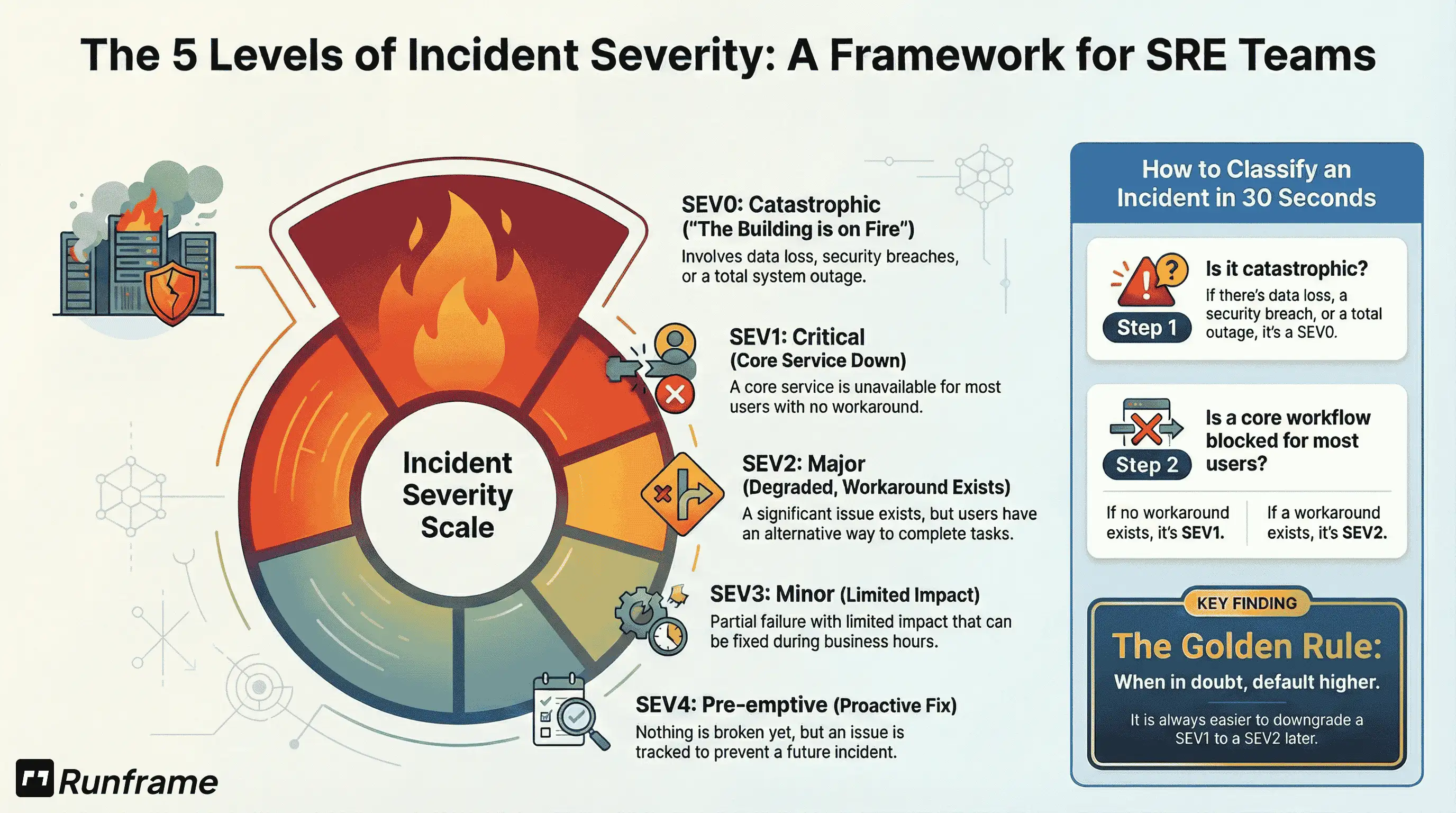
SEV0-SEV4: The Framework
We recommend starting at zero, not one. SEV0 = zero room for error—it's more intuitive than SEV1 being your worst case.
That said, if your team is under 50 people, you might start with just 3 levels (SEV1-SEV3) and add SEV0 and SEV4 as you scale. Here's the full framework:
| Severity | Impact | Response | Who |
|---|---|---|---|
| SEV0 | Catastrophic. Data loss, security breach, total outage, or critical revenue-impacting failure | Ack target: 15 min | War room (IC + core responders; exec notification depends on your org) |
| SEV1 | Critical. Core service down for everyone | Ack target: 30 min | On-call + backup |
| SEV2 | Major. Significant degradation, workaround exists | Ack target: 1 hour | On-call |
| SEV3 | Minor. Limited impact, business hours fix | Business hours | Don't page |
| SEV4 | Pre-emptive. Could break, proactive fix | Backlog | Owner + due window |
The difference between SEV1 and SEV2? One question: Is there a workaround?
Checkout completely broken = SEV1 (no workaround). Search down but category browsing works = SEV2 (workaround exists).
Simple.
What teams at your stage say:
"Start with 3 levels. Don't over-engineer day one. You can always add SEV0 and SEV4 later."
— CTO, 40-person startup
"We added SEV4 when we hit 80 people. Prevented 38 out of 47 potential incidents in 6 months."
— Engineering Manager, Series B SaaS
Why SEV4 Matters (And When to Add It)
Many teams start without SEV4—it can feel like overhead when you're just trying to survive incidents.
"If nothing's broken, why track it?"
Fair question. Here's when it becomes valuable:
If you're under 50 people: You probably don't need SEV4 yet. Focus on responding to actual incidents first. Many top incident management tools for startups don't include SEV4 tracking for this reason.
When you hit 75-100 people: This is when SEV4 becomes valuable. You have enough operational maturity to track "could break" work systematically.
What happens without SEV4 at scale:
→ Disk space hits 100% at 2 AM (could have been SEV4 at 80%)
→ SSL cert expires, users see security warnings (could have been SEV4 at 30 days)
→ Database query gets 10x slower overnight (could have been SEV4 when it hit 2x)
Without SEV4, you're always reacting. Never preventing.
What Each Level Means
SEV0: The Building Is On Fire
Complete outage. Data loss. Security breach. Critical revenue-impacting failure.
Database corrupted? Multi-region outage? Authentication completely broken? Payment processing down?
That's SEV0. Wake everyone. War room. You have 15 minutes.
Real examples:
- Database corruption with data loss (can't recover from backup)
- AWS us-east-1 down AND your backup region failed
- Security breach exposing customer data
- Authentication completely broken (nobody can log in)
- Payment processing down (revenue loss >$10K/hour)
SEV1: Core Service Down
Major impact but not catastrophic. Core service unavailable for most/all customers, with no workaround.
API totally down. Checkout completely broken. Search gone (if search is a core workflow for your product). Auth intermittent for a meaningful subset of users.
Page on-call immediately. All hands on deck during business hours. 30-minute target.
Real examples:
- Total API outage (all endpoints returning 500)
- Checkout flow completely broken (can't process payments)
- Search functionality down (core feature for your product)
- Authentication intermittent (meaningful subset of users can't log in)
- Performance degradation (APIs materially degraded, not just slower)
SEV2: Significant but Workaround Exists
Broken but usable. Meaningful subset of customers affected, or core functionality degraded but usable.
Checkout failing for some users? File uploads broken? API materially degraded but responding?
Primary on-call handles it. Don't wake backup. 1-hour target.
Real examples:
- Checkout failing for some users (payment gateway issue for some cards)
- File uploads completely broken (users can't upload, but can use existing files)
- API materially degraded but usable (users can still complete key workflows, possibly slower)
- Dashboard not loading (users can still use core product)
- Single region degradation (multi-region setup, one region struggling)
SEV3: Minor
Partial failure. Limited impact. Not urgent.
Profile pictures broken. Intermittent errors that auto-recover. Reporting delayed.
Fix during business hours. Don't page on-call. Can wait until morning.
Real examples:
- Minor feature broken (user profile pictures not displaying)
- Intermittent errors that auto-recover (happens a few times/hour, clears itself)
- Reporting delay (analytics data not real-time, updates hourly)
- Non-critical integration failing (Slack incident notifications delayed, email works)
- UI polish issues (button misaligned, font wrong)
SEV4: Pre-emptive
Nothing broken yet. But something could.
Disk at 80%. SSL expiring soon. Query slowing down. Dependency vulnerability. Monitoring gap.
Create a ticket with an owner + due window (e.g., "this sprint" / "within 30 days"). No page needed.
Real examples:
- Disk space at 80% (not critical yet, but will be in 2 weeks)
- SSL certificate expiring in 30 days
- Database query degrading (taking 2x longer, not failed yet)
- Dependency vulnerability (CVE in a library, not exploited)
- Monitoring gap discovered (no alerting for a critical service)
Classify Fast. Don't Debate.
Target: 30 seconds to classify.
When you're in the middle of an incident, speed matters more than perfection. If you're debating SEV1 vs SEV2 for 5 minutes while customers wait, just pick one and move on.
Pro tip: Default higher when uncertain. It's easier to downgrade a SEV1 to SEV2 later than explain why you under-classified and delayed response.
Is this catastrophic (data loss, security breach, total outage)? → SEV0
Is a core workflow blocked for most users?
- No workaround → SEV1
- Workaround exists → SEV2
Otherwise: limited impact → SEV3; not broken yet → SEV4
Tie-breaker: pick higher, note why, downgrade later.
Common Questions (What We've Learned from Teams at Your Stage)
"It's 2 AM and I'm not sure if this is SEV1 or SEV2"
Default SEV1. Assess the situation. Page backup only if blocked or primary hasn't responded within your escalation window.
You can downgrade in the morning. You can't un-break customer trust.
"Only 5% of users are affected, but they're our biggest customers"
Use your "materially impacted" definition. If those 5% represent 40% of revenue, it's material.
SEV1.
"The bug is cosmetic but our CEO is freaking out"
Still SEV3. Severity = customer impact, not internal panic.
But maybe add "Executive visibility" as a separate flag. Some teams use:
- Severity: SEV3 (minor)
- Priority: P1 (fix today)
- Visibility: High (CEO watching)
This way you fix it fast without training on-call to page for non-issues.
"We fixed it in 5 minutes, do we still call it SEV1?"
Yes. Severity is based on potential impact, not duration.
If the database was completely down (even for 5 minutes), that's SEV1.
Duration doesn't change severity. It goes in MTTR metrics.
What Makes Severity Levels Actually Work
The key is specificity.
Vague (doesn't help at 3 AM): "SEV1 is when something important is broken."
Specific (makes decisions instant): "SEV1 is when a core service is down for all customers, with no workaround."
Tools like Grafana Cloud IRM and Runframe enforce severity at the workflow level: escalation policies trigger based on SEV, not manual decisions. PagerDuty and its alternatives can also automatically escalate based on severity, but only if you've defined what each level means for your specific context.
Frameworks That Actually Work (Choose Based on Your Size)
Startup Starter (20-50 people)
Start simple with 3 levels. Add more as you scale.
| Severity | Impact | Response |
|---|---|---|
| SEV1 | Core service down | Page everyone |
| SEV2 | Degraded but usable | Page on-call |
| SEV3 | Minor, can wait | Business hours |
Scaling Company (50-150 people)
Add SEV0 when catastrophic incidents become possible.
| Severity | Impact | Page Who? | Ack SLA |
|---|---|---|---|
| SEV0 | Catastrophic | War room | 15 min |
| SEV1 | Core service down | On-call + backup | 30 min |
| SEV2 | Significant degradation | On-call | 1 hour |
| SEV3 | Minor issues | Business hours | 1 day |
| SEV4 | Proactive work | Backlog | None |
Enterprise-Bound (150+ people)
Full framework with war rooms and executive escalation.
| Severity | Impact | Page Who? | Ack SLA |
|---|---|---|---|
| SEV0 | Catastrophic | War room | 15 min |
| SEV1 | Core service down | On-call + backup | 30 min |
| SEV2 | Significant degradation | On-call | 1 hour |
| SEV3 | Minor issues | Business hours | 1 day |
| SEV4 | Proactive work | Backlog | None |
How to Evolve Your Severity Levels as You Scale
Starting with SEV1 vs SEV0
If you're under 50 people: Starting with SEV1-SEV3 is totally fine. Many teams do this.
As you grow past 100 people: Consider adding SEV0 for truly catastrophic incidents (data loss, security breaches). "Zero" = zero room for error, which makes the hierarchy more intuitive.
Why it matters: As your maximum possible blast radius grows, you need a tier above "critical outage" for existential threats.
When to Add SEV4 (Proactive Work)
If you're under 50 people: You probably don't need SEV4 yet. Focus on responding to actual incidents first.
When you hit 75-100 people: This is when SEV4 becomes valuable. You have enough operational maturity to track "could break" work systematically.
What changes: Instead of jumping from "everything's fine" to "everything's on fire," you can track warning signs (disk at 80%, SSL expiring soon, query degrading) and fix them before they page someone at 3 AM.
One team added SEV4 at 80 people and prevented 80% of potential incidents over 6 months.
Ignoring Business Impact
The problem: Technical severity ≠ business severity. A "minor" pricing page typo can be catastrophic if it causes chargebacks.
The fix: Define severity in terms of customer impact and revenue, not technical complexity.
Severity vs Priority
Teams confuse these constantly.
Severity = Business impact (doesn't change)
Priority = Fix order (changes based on context)
Example:
Footer has a typo: "Contact sales@compnay.com"
- Severity: SEV3 (minor impact, users can still email sales@company.com directly)
- Priority: P3 (fix this week)
BUT: Legal says the wrong email violates our contract SLA.
- Severity: Still SEV3 (customer experience unchanged)
- Priority: Now P1 (fix today, legal risk)
Severity didn't change. Priority did.
Another example:
Database completely down.
- Severity: SEV0 (catastrophic)
- Priority: P1 (obviously)
But your lead DBA is on vacation and backup doesn't know the system.
- Severity: Still SEV0 (impact unchanged)
- Priority: Still P1, but now you escalate to vendor support
Severity describes impact. Priority describes response order.
"Severity is 'how bad is it?' Priority is 'when do we fix it?' Don't conflate them."
— Engineering Manager, Series B Healthcare SaaS
Make It Work: Rollout Plan
Week 1: Start Simple
If you're 20-50 people: Copy the 3-level version (SEV1-SEV3) and customize examples to your product.
If you're 50-150 people: Use the 4-level version (SEV0-SEV3 or SEV1-SEV4).
If you're 150+ people: Go with the full 5-level framework (SEV0-SEV4).
The key is customizing examples to YOUR business. B2B looks different than B2C. Enterprise SaaS looks different than consumer apps.
Week 1: Get Buy-In
Share in Slack. Review in standup.
Most importantly: Get agreement from the people who'll be woken up at 3 AM.
If on-call hates it, they won't use it.
"The best severity framework is the one your team actually uses. If on-call hates it, they'll ignore it."
— SRE Manager, 180-person infrastructure company
Weeks 2-5: Use It
Classify every incident. Track how it goes.
Week 6: Iterate
After 30 days, ask:
- Classification debates? → Clarify definitions
- SEV3s waking people? → Make "don't page" explicit
- SEV4s actually getting fixed? → It's working
Expect to adjust 2-3 times in the first 6 months. That's normal.
Quick Reference: During an Incident
Q: "Is this SEV1 or SEV2?"
A: Can customers work around it? Yes = SEV2. No = SEV1.
Q: "Only 10% of users affected. Still SEV1?"
A: Is that 10% material to your business? (Check your definition)
Q: "We fixed it fast. Was it really SEV1?"
A: Severity = potential impact, not duration. Yes, still SEV1.
Q: "CEO is panicking but customer impact is minor"
A: Severity = customer impact. This is SEV3. (But maybe Priority P1)
Q: "Not sure. What do I do?"
A: Default higher. Downgrade later if needed.
FAQ
Q: SEV0-SEV4 or SEV1-SEV5?
Q: Can't tell if SEV1 or SEV2?
Q: How many levels?
Q: Does severity change during an incident?
Q: Who decides?
Generate Your Framework in 2 Minutes
If you want a copy/paste template, there's a severity matrix generator here:
For definitions of each cell in the matrix, see the incident severity matrix reference.
Or copy the table from this article and adapt it. Either way, have something defined before your next incident.